 ZipCombiner
Your Google Drive / Takeout zips, back in one folder.
ZipCombiner extracts every zip at once and combines them into your folder structure. It can easily put your Google Photos dates and places back.
- takeout-20260912T201917Z-1-001.zip
- takeout-20260912T201917Z-1-002.zip
- takeout-20260912T201917Z-1-003.zip
- takeout-20260912T201917Z-1-004.zip
- takeout-20260912T201917Z-1-005.zip
- takeout-20260912T201917Z-1-006.zip
- takeout-20260912T201917Z-1-007.zip
- takeout-20260912T201917Z-1-008.zip
- takeout-20260912T201917Z-1-009.zip
- takeout-20260912T201917Z-1-010.zip
Done: everything in one folder
10 zips · 19.1 GB · 12,000 photos restored · sample export
| Contents | Items | From | To | Status |
|---|---|---|---|---|
| Gmailzip 001 → One folder | All mail, 1 mailbox | zip 001 | One folder | Done |
| Google Drivezips 002–006 → One folder | 3,412 files | zips 002–006 | One folder | Done |
| Google Photoszips 007–010 → One folder | 12,000 photos and videos | zips 007–010 | One folder | Done, dates and places restored |
| Contacts and Calendarzip 010 → One folder | 2 files | zip 010 | One folder | Done |
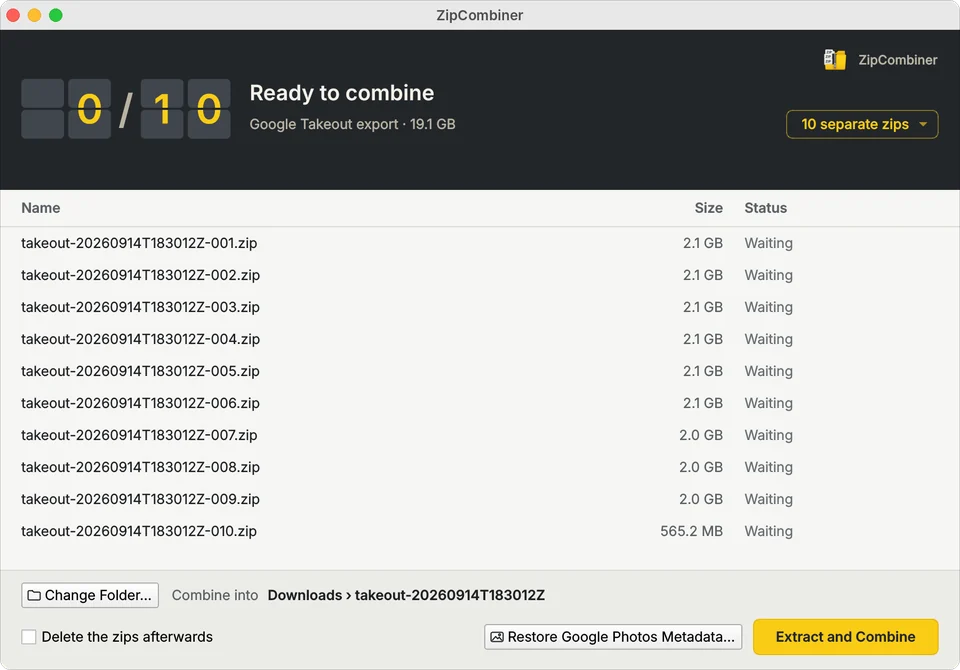
A sample export: ten Takeout zips dropped into ZipCombiner, one row for each part, all bound for one folder.
ZipCombiner in action, start to finish
Ten zips from a 19 GB sample Takeout go into one folder, then 12,000 photos and videos get their dates and places back. 25 seconds, no sound.
Three steps, no decisions
-
Drop in every zip
Takeout, Drive, Photos or a split zip (.z01, .zip.001): ZipCombiner works out what you've got and suggests a new folder next to your zips.
Waiting
-
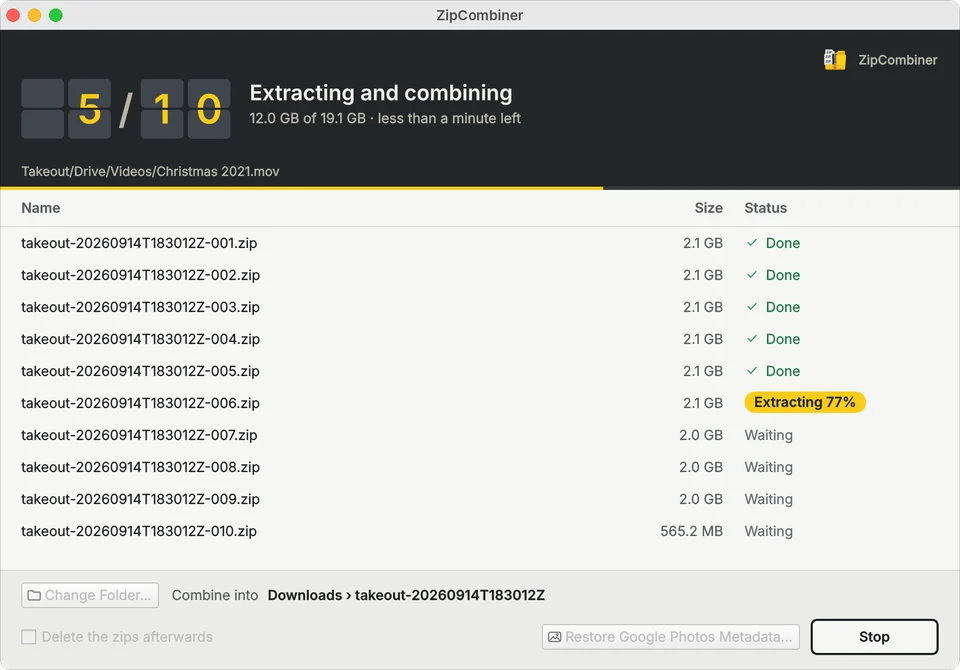
Watch each zip finish
Every zip gets its own row, with a count of zips done and the time left. If one zip is damaged, the rest still finish.
Extracting 77%
-
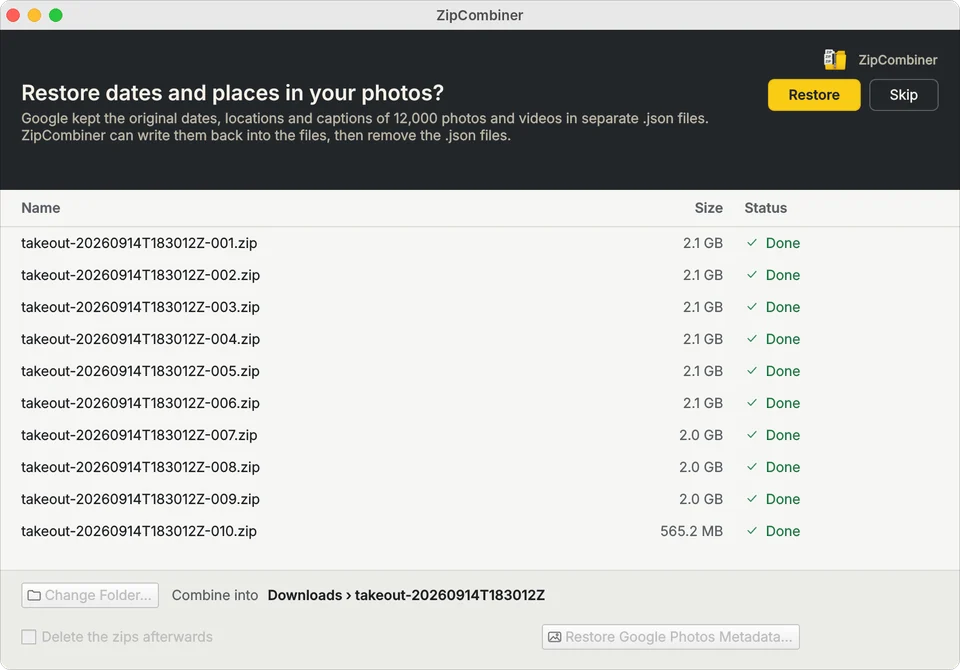
Get your photo info back
When your Takeout includes Google Photos, ZipCombiner offers to put each photo's date taken, location and caption back inside it, filling in only what's missing.
Done
Dates, places and captions, back in every photo
Google Takeout keeps them in a separate .json file beside each photo, so apps like Apple Photos can't see them. ZipCombiner writes them back in. How it works
PXL_20190704_183522114.jpg Straight from Takeout
- Date taken
- None
- File date
- 14 Sep 2026, the download day
- Location
- None
- Caption
- None
PXL_20190704_183522114.jpg After ZipCombiner
- Date taken
- 4 Jul 2019, 6:35 PM
- File date
- 4 Jul 2019, 6:35 PM
- Location
- 48.52° N, 72.23° W
- Caption
- Lac-Saint-Jean, summer
Example photo. JPEG, PNG, MP4 and MOV files get all of it; other formats, such as HEIC, get their file dates.
Made for the export you actually have
- Private
- Everything happens on your computer. No account, no uploads, no tracking.
- Built for big exports
- Dozens of zips and tens or hundreds of gigabytes, each zip with its own row and status.
- Careful with your files
- Nothing is skipped silently: every zip ends Done or Couldn't combine, with the reason one click away.
Guides
Plain answers for the questions people search for when Google hands them a pile of zips.
Google Takeout and Drive
- How to combine Google Takeout zip files into one folderCombine Google Takeout zips
- How to rebuild a Google Drive folder from its zip downloadsRebuild a Drive folder
- Why Google splits your download into multiple zip filesWhy Google splits downloads
- Files missing or duplicated after extracting several zips?Missing or duplicated files
- Google Takeout: .zip or .tgz?Takeout: .zip or .tgz?
- Google Takeout download failed, or a part is missing?Takeout download failed
Google Photos
- How to move Google Photos to Apple Photos and iCloudGoogle Photos to Apple Photos
- How to restore Google Photos dates and locations from TakeoutRestore photo dates and places
- What are the .json files in my Google Takeout?What the .json files are
- Google Takeout photos showing the wrong date?Photos show the wrong date
Split zips
Questions
Why did Google Takeout split my download into multiple zip files?
Takeout caps each zip at the size you chose when you set up the export. Bigger exports come as several complete zips; ZipCombiner extracts them all into one folder.
Do I have to unzip each file first?
No. Drop all the zips in at once and click Extract and Combine. ZipCombiner works out what kind of zips they are by itself.
What happens to my Google Photos dates and locations?
Takeout keeps them in separate .json files. After extracting, ZipCombiner offers to write each photo's date taken, location and caption back into it, then removes the .json files.
Does ZipCombiner work on Mac and Windows?
Yes. The Mac App Store version runs on every Mac with macOS 12 or later, Apple silicon and Intel. The Windows version, for Windows 10 and 11, is sold through Gumroad.
Is it a subscription?
No. It's $4.99, once.
Are my files uploaded anywhere?
No. Everything happens on your own computer. There's no account and nothing is sent to us or anyone else.
Can it open split zips like zip.001 or .z01?
Yes. It recognises split zips (name.zip.001 or name.z01) and rebuilds them before extracting.
Are password-protected zips supported?
No, not at the moment.
$4.99, once
One price on both platforms. No subscription, no account.
| Platform | Runs on | Price | Get it |
|---|---|---|---|
| MacMac App Store | Every Mac with macOS 12 or later, Apple silicon and Intel | $4.99 | Get it on the Mac App Store |
| WindowsGumroad | Windows 10 and 11 · install notes | $4.99 | Get it for Windows |