 ZipCombiner
What gets restored
| From the .json file | Written into the photo or video |
|---|---|
Date takenphotoTakenTime | The date taken, and the file's own dates |
LocationgeoData | GPS latitude, longitude and altitude |
Captiondescription | The photo's description |
ZipCombiner only fills in what's missing: if a photo already has its date or location inside, that stays as it is. JPEG, PNG, MP4 and MOV files get all of it. Other formats, such as HEIC, get their file dates set to the date taken. Dates are written in your computer's time zone.
Restore it in three steps
- Extract your Takeout with ZipCombiner as usual, or use Restore Google Photos Metadata… on a Takeout folder you already unzipped.
- When ZipCombiner asks Restore dates and places in your photos?, click Restore.
- Watch the count of photos go by. When it's done, your photos sort by the day they were taken, show where they were taken, and keep their captions.
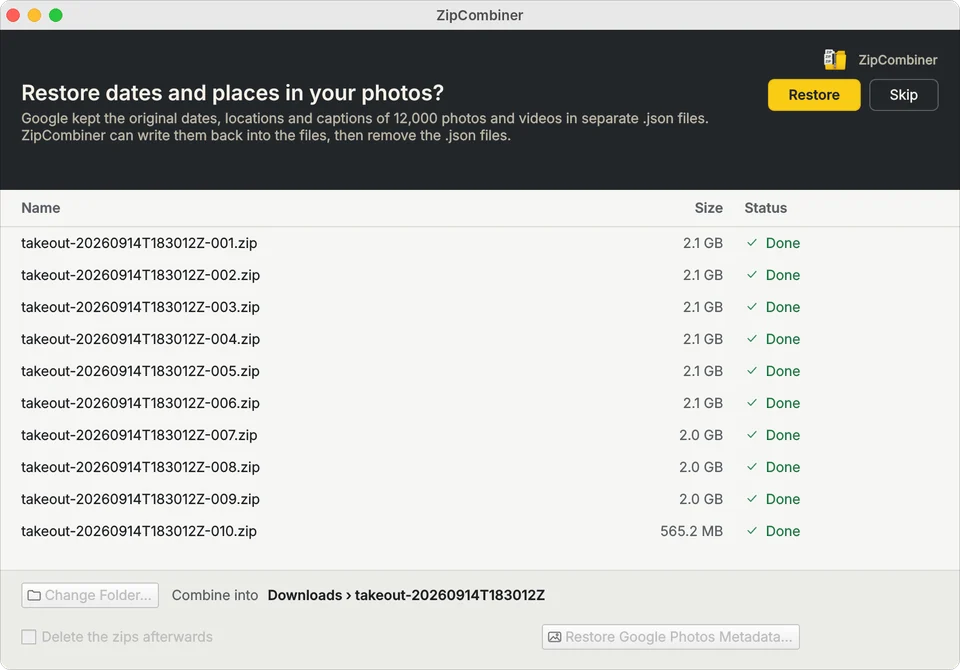
Already unzipped your Takeout?
Click Restore Google Photos Metadata… at the bottom of the window and choose the Takeout folder. ZipCombiner finds every photo and its .json file, including the newer .supplemental-metadata.json names, cut-off names, edited copies ending in -edited, and duplicates like IMG_1234(1).jpg.
What happens to the .json files
Once a photo has its information back, its .json file is deleted, so your folder holds just your photos and videos. A .json file is kept if anything went wrong with its photo; Details… lists those photos.
Questions
Does it change my photos?
It adds the missing date, location and caption to each file's metadata. The picture itself isn't touched, and information already in the file is left alone.
Which formats get the full information?
JPEG, PNG, MP4 and MOV get the date taken, location and caption. Other formats, such as HEIC, get their file dates set to the date taken.
What time zone are the dates written in?
Your computer's time zone. Photos taken while travelling show the time at home.
Are the .json files deleted?
Yes, once their photo has been updated. A .json file is kept if its photo couldn't be updated.
Does anything get uploaded?
No. Everything happens on your own computer.